Linux Basics
Greetings, fellow tech enthusiasts! I'm thrilled to share my latest learnings with all of you.

| Table of Content |
| 1. Linux History |
| 2. Linux Features |
| 3. Linux Basic Commands |
| Task 1. |
| 1. Check your present working directory. |
| 2. Create a nested directory A/B/C/D/E |
| 3. List all the files or directories including hidden files. |
Linux History:
Linux is an operating system and its roots can be traced back to Unix, a powerful operating system created by Ken Thompson, Dennis Ritchie, and others at Bell Labs in the 1960s and 1970s.
Linus Torvalds, a Finnish computer science student, invented Linux, an open-source operating system that became popular in 1991. Torvalds didn't like the limitations of operating systems back then, so he decided to create an OS that anyone could use and modify.
Linux is a free and open source that is publicly available. 91% of applications are there on internet is created on Linux.
Linux became so popular because of its inbuilt natural features. Let's learn all the natural features.
Customizable: Users can choose from various desktop environments, software packages, and system configurations to create a tailored computing experience based on individual preferences and requirements.
Open Source: Linux source code is freely accessible to everyone
Security: Linux is highly secure and robust. It includes user account permissions, encrypted file systems, and built-in firewall capabilities making it more secure.
Multitasking and Multiuser Support: Linux supports multitasking, enabling users to run multiple applications simultaneously. It allows multiple users to operate.
Community Support: The Linux community is vast and active
Linux Basic Commands:
| Commands | Description |
| ls | List files and directories. |
| pwd | present working directory |
| uname | it shows the name of the kernel |
| cd | changes the working directory |
| mkdir | create a new directory |
| rmdir | remove the directory |
| rm | deletes a file |
| cp | copies files and directories, including their content. |
| touch | create a new empty file |
| mv | move and rename files and directories |
| ls -d */ | to list only directories |
| zip and unzip | creates and extracts zip archive files |
| tee | prints command outputs in terminal and a file |
Tasks:
Task 1 of #90DaysofDevOpsChallenge
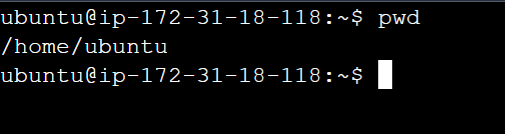
What is the Linux command to Check your present working directory?
To check your present working directory the command is "pwd"
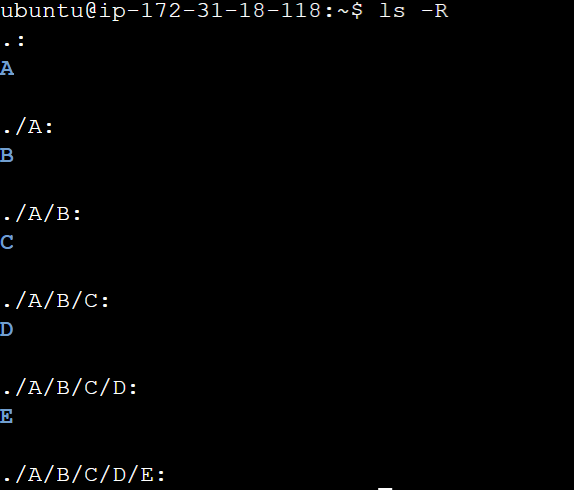
Create a nested directory A/B/C/D/E
mkdir -p A/B/C/D/E
ls -R To recursively list the directory


List all the files or directories including hidden files.
ls -a

Thank you Friends, Your support and readership are deeply appreciated as we continue on this journey together. Looking forward to connecting with you again in our next encounter!